
Take your career to the desired level with our Power BI certification training. Our hands-on and project-based approach, combined with certified instructors, will give you the practical experience and skills needed to succeed in data visualization and business intelligence.
Power BI Course (Duration : 8 Weeks)
Power BI Certification Course Key Highlights
NearLearn’s Power BI certification course is curated by subject matter experts to help you clear the official Microsoft Power BI Data Analyst Exam: PL-300. This course will help you gain expertise in Business Analytics and throughout the training, you will master the concepts such as Power BI Desktop, Architecture, DAX, Service, Mobile Apps, Reports, Q&A, and many more with industry-relevant use cases. This Power BI training ensures that you get hands-on experience in real-time projects. Learn Power BI from 10+ years of experienced industry experts.
Why Power BI Course in NearLearn?
With newer tools emerging every day to help solve the crisis of data management, most organizations have already moved in or have plans to use Business Intelligence in solving their crisis. Power BI is one of the most popular BI tools offered by leading software giant Microsoft mainly aimed to help everyone analyze and visualize their data.
Who should take the Power BI Course?
The Power BI Training in Bangalore will make the candidate professional, for this role requires the perfect amalgam of experience, data science knowledge, and using the correct tools and technologies. It is a good career choice for both new and experienced professionals. Aspiring professionals of any educational background with an analytical frame of mind are most suited to pursue this Program a basic understanding of 10+2 level mathematics and programming will be an added advantage, including:
- Any Fresher or Jobseeker who has 10+2 level mathematics and basic programming knowledge.
- Students in UG/ PG Programs with 10+2 level mathematics and basic programming knowledge
Power BI Training Requirements
Computer skills, Basic knowledge of Mathematics and Basic knowledge of Data Science concepts.
Contact us today and Get Power BI Certification in Bangalore.
Reach us at +91-9739305140, If you are looking for Best Power BI Course Training in Bangalore
Course Curriculum
Introduction to Power BI
- Lecture1.1 Introduction to Business IntelligenceLecture1.2 Self-Service Business Intelligence (SSBI)Lecture1.3 Introduction to Power BILecture1.4 Traditional BI vs. Power BILecture1.5 Power BI vs. Tableau vs. QlikViewLecture1.6 Uses of Power BILecture1.7 The Flow of Work in Power BI
Lecture1.8 Working with Power BI
Lecture1.9 Basic Components of Power BI
Lecture1.10 Comparison of Power BI Version
Lecture1.11 Introduction to Building Blocks of Power BI
Lecture1.12 Data model and importance of Data Modeling
Power BI Desktop and Data Transformation
Lecture2.1 Data Sources in Power BI Desktop
Lecture2.2 Loading Data in Power BI Desktop
Lecture2.3 Views in Power BI Desktop
Lecture2.4 Query Editor In Power BI
Lecture2.5 Transform, Clean, Shape, and Model Data
Lecture2.6 Manage Data Relationship
Lecture2.7 Editing a Relationship
Lecture2.8 Cross Filter Direction
Lecture2.9 Saving Workfile
Lecture2.10 Measures
Data Analysis Expression (DAX)
Lecture3.1 Introduction to DAX
Lecture3.2 Importance of DAX
Lecture3.3 Data Types in DAX
Lecture3.4 DAX Calculation Types
Lecture3.5 Steps to Create Calculated Columns
Lecture3.6 Measures in DAX
Lecture3.7 DAX Syntax
Lecture3.8 DAX Functions
Lecture3.9 DAX Operators
Lecture3.10 DAX Tables and Filtering
Data Visualization
Lecture4.1 Introduction to Visuals In Power BIPreview
Lecture4.2 Visualization Charts in Power BI
Lecture4.3 Matrixes and Tables
Lecture4.4 Slicers and Map Visualizations
Lecture4.5 Gauges and Single Number Cards
Lecture4.6 Modifying Colors in Charts And Visuals
Lecture4.7 Shapes, Text Boxes, and Images
Lecture4.8 Custom Visuals
Lecture4.9 Page Layout and Formatting
Lecture4.10 Bookmarks and Selection Pane
Lecture4.11 KPI Visuals
Lecture4.12 Z-order
Lecture4.13 Grouping and Bining
Power BI Service
Lecture5.1 Introduction to Power BI Service
Lecture5.2 Creating a Dashboard
Lecture5.3 Quick Insights in Power BI
Lecture5.4 Configuring a Dashboard
Lecture5.5 Power BI Q&A
Lecture5.6 Ask Questions about your Data
Lecture5.7 Power BI Embedded
Lecture5.8 Bookmarks and buttons
Connectivity Modes
Lecture6.1 Data Sources Supported in Power BI
Lecture6.2 Exploring Live Connections to Data Sources
Lecture6.3 Connecting Directly to SQL Azure
Lecture6.4 Connecting Directly to SQL Server Analysis Services/My SQL
Lecture6.5 Import Power View and Power Pivot
Lecture6.6 Data Gateways
Lecture6.7 Direct Query vs. Import Connectivity modes
Lecture6.8 Connecting Power BI in Excel
Power BI Report Server
Lecture7.1 What is Power BI Report Server?
Lecture7.2 Key Features of Report Server
Lecture7.3 The architecture of the Report Server
Lecture7.4 Limitations of Report Server
Lecture7.5 Power BI Report Server vs. Power BI Service
Lecture7.6 Acquiring and Installing Power BI Report Server
Lecture7.7 What is a Web Portal?
Lecture7.8 Paginated Reports
Lecture7.9 Row Level Security
R & Python in Power BI
Lecture8.1 Brief concepts about R
Lecture8.2 R Programming Concepts
Lecture8.3 Create R Scripts for BI
Lecture8.4 Python Programming
Lecture8.5 Python Scripts in BI
Lecture8.6 Python integration with Power BI
Advanced Analytics in Power BI
Lecture9.1 Use Parameters
Lecture9.2 Create a data flow
Lecture9.3 Introduction to Anomaly Detection
Lecture9.4 Introduction to Smart Narrative
Lecture9.5 Introduction to Sensitivity labels in Power BI
Lecture9.6 Deployment Pipeline
In-Class Project
Lecture10.1 Power BI Service
Lecture10.2 Row Level Security
Lecture10.3 Visuals and Charts
Lecture10.4 Power BI Desktop
Lecture10.5 Handling Workspaces
Course Schedule
Course ID
Course Name
Date
Price
Sample Certificates
IABAC Certificate
AI & Machine Learning Video
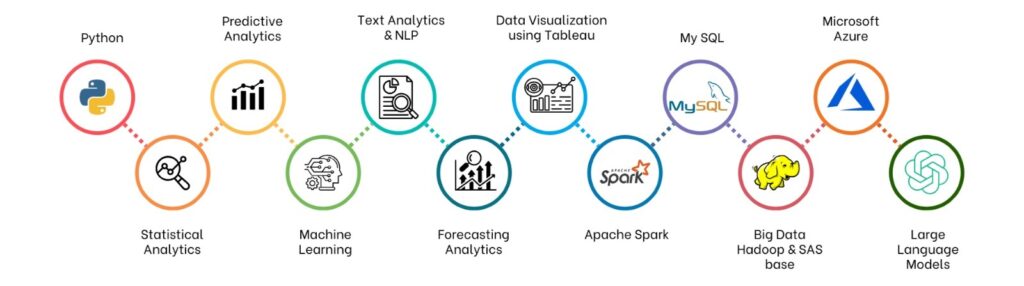
Programming Languages & Tools Covered
Why NearLearn?

Experience Elevated Learning

Expert Guidance, Industry Insights
 Tailored Learning Paths

Career Development Support
Flexible Learning Options
 Industry-Aligned Certifications
Community Engagement
Unparalleled Support
 Empower Yourself
With NearLearn
Empower Yourself
With NearLearn
Partner with NearLearn to Transform Your Workforce
Putting money into professional growth is like putting money into the future of your company. When it comes to corporate training, Nearlearn is your reliable partner. We offer the knowledge and resources you require to empower your workers, propel innovation, and achieve long-term success in your business.
Get in touch with us right away to discuss the ways in which the training solutions offered by Nearlearn can revolutionize your career.
Our Clients
Testimonials

Manasa HG
Juniper Networks"Nearlearn is one of the best institutes for Data science and Machine learning training in Bangalore. Training sessions were very interactive. Trainer has very good subject knowledge,I am very satisfied with both Trainer & Institute."

Tushar Chorghe
GeBBS Healthcare Solutions"I would rate services provided by NearLearn as excellent because of the instructor and venue with the required discount for the course. The overall experience was very good and will surely look forward to attend many more trainings"